Table of Contents
What is IDM Video Downloader?
Internet Download Manager (IDM) is a popular download manager for Windows that helps users download files faster and more efficiently than a regular web browser. It supports downloads of videos, software, documents and other online content while providing advanced download acceleration technology for improved speeds.
One of IDM’s most useful features is its browser integration. It works with popular browsers like Google Chrome, Mozilla Firefox, Microsoft Edge and Opera automatically detecting downloadable videos and displaying a download button for quick access.
IDM also includes features such as download scheduling, batch downloads and resume support. If a download is interrupted due to a network issue or system shutdown, it can continue from where it stopped. With its speed, reliability and ease of use, IDM remains one of the most trusted download managers for Windows users.
User Interface and Ease of Use
One of the biggest reasons users choose Internet Download Manager is its simple and user-friendly interface. The software is designed to be easy to use, even for people who have never used a download manager before. After installation, IDM automatically integrates with supported web browsers allowing it to detect downloadable content without requiring any complicated setup or configuration.
When you visit a webpage containing a supported video, IDM can automatically recognize the media stream and display a convenient download button near the video player. This allows you to start a download with just a few clicks instead of manually searching for links or adjusting technical settings. The process is straightforward and works seamlessly in the background, making it accessible for both beginners and experienced users.
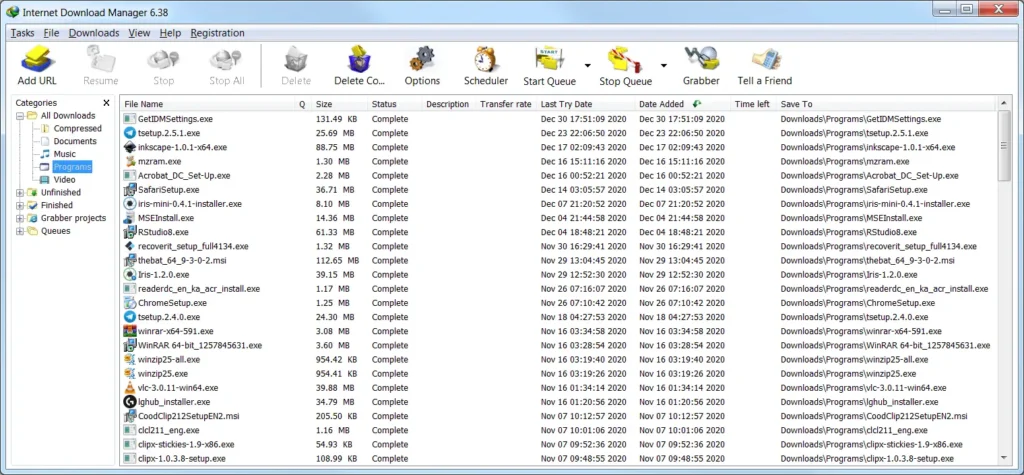
In addition to its ease of use, IDM provides a clean dashboard where you can view active, completed and scheduled downloads in one place. Important options such as pause, resume, delete and schedule are clearly displayed making download management simple and efficient. Whether you’re downloading a single video or managing multiple files at the same time the intuitive interface helps ensure a smooth and hassle free experience.
Why Download YouTube Videos Using IDM?
There are many tools available online, but IDM remains one of the most reliable options to download youTube videos because of its advanced features.
Fast Downloads
IDM uses advanced download acceleration technology that speeds up downloads by splitting files into multiple parts and downloading them simultaneously. This helps improve performance compared to normal browser downloads especially for large files like videos. The process runs automatically in the background so users don’t need to configure anything manually.
Resume Downloads
When downloading large files or media content, interruptions can sometimes occur due to unstable internet connections, power failures or unexpected system shutdowns. In such situations starting the download again from the beginning can waste both time and bandwidth. IDM solves this problem by allowing users to resume unfinished downloads from the exact point where they stopped. This ensures a smoother and more reliable downloading experience especially when handling large video files or slow network conditions.
High Quality Video Support
Users can choose from multiple video quality options depending on what is available for each file or media source. This allows them to balance between video clarity and storage space based on their needs. Higher resolutions such as HD and Full HD provide better visual quality, making them ideal for larger screens and detailed viewing while lower resolutions can help save storage and download faster on slower internet connections.
Browser Integration
IDM is designed to automatically recognize media files while browsing supported websites, which helps streamline the downloading process. Once a video or downloadable file is detected, it displays a small download panel near the content, allowing users to save it quickly without manually copying links or using additional tools. This automatic detection works smoothly with popular browsers and makes downloading more convenient and efficient for everyday use.
Key Features to Download YouTube Videos
1. Automatic Video Detection
IDM automatically detects video streams and provides a button to download youtube videos instantly.
2. Download Acceleration
The software increases download speed helping users download youtube videos more efficiently.
3. Multiple Quality Selection
Choose different resolutions when you download youtube videos depending on your storage and viewing preferences.
4. Download Scheduling
Schedule downloads and automatically download youtube videos during specific times.
5. Batch Downloads
Users can manage multiple downloads and download youtube videos more effectively.
6. Resume Support
If your internet disconnects while you download youtube videos IDM can continue from where it stopped.
7. Download Organization
All downloaded files are automatically organized into categories after you download youtube videos.
8. Lightweight Software
IDM requires very few system resources while allowing users to download youtube videos efficiently.
How to Download Any Video From YouTube
Follow these simple steps to download youtube videos using Internet Download Manager:
Step 1: Download and Install IDM
- Go to the Download Link.
- The Provided link will download a RAR file, extract it using WinRAR.
- Install Internet Download Manager on your computer.
Step 2: Enable Browser Integration
- Open IDM and ensure browser integration is enabled.
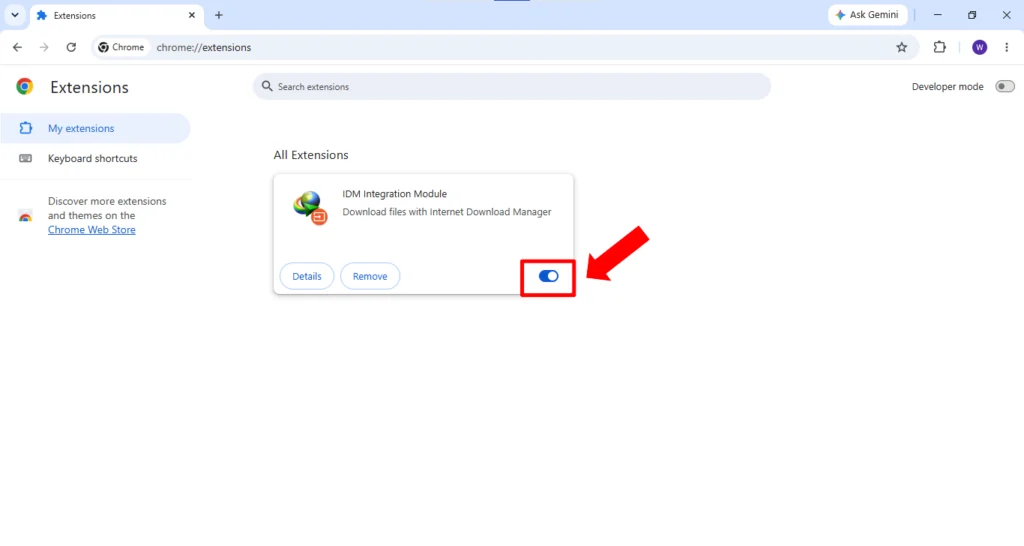
Note: If you can’t find or install the IDM extension, enable the IDM Integration Module (IDM Extension) in your browser settings or from IDM Options, then restart your browser to fix the issue. You can check the full guide here.
Step 3: Open YouTube
- Visit YouTube and play the video you want to watch offline.
Step 4: Click Download Button
- When IDM detects the video, click the Download This Video button.
Step 5: Select Quality
- Choose your preferred format and quality to download youtube videos.
Step 6: Start Download
- Click Start Download and wait for IDM to download youtube videos to your computer.
- Done! You have successfully used IDM to download youtube videos.
Conclusion
If you regularly download youtube videos, Internet Download Manager is one of the best tools available. Its automatic detection fast speeds and resume support make it easy to download youtube videos with minimal effort.
Whether you want to download youtube videos for educational purposes, offline viewing or personal convenience IDM provides a simple and reliable solution. For users looking to download youtube videos quickly and efficiently IDM remains a top choice.
Download Links
Note: Password for all files is thelearnerz.com
By clicking this button your download will start automatically, after the countdown. Please click only once and wait for the application to begin downloading.
Download IDMNote: If you want to download latest version of IDM visit @IDM.