Table of Contents
What is AnyDesk?
AnyDesk is a popular application that lets you access and control a computer remotely from almost anywhere. It’s known for maintaining fast and responsive connections so interactions feel smooth even when the internet speed isn’t ideal.
The program works across a variety of platforms such as Windows, macOS, Linux, Android and iOS. It also includes useful tools like file sharing, secure connections and features similar to a VPN to help protect your data during sessions.
In simple terms, it’s a convenient solution for both beginners and experienced users who want to handle remote work, support tasks or file transfers without going through a complicated setup process.
User Interface and Ease of Use
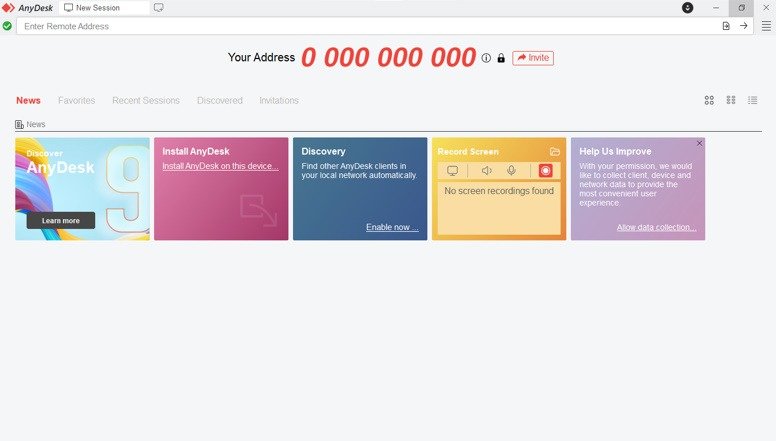
The interface of AnyDesk is designed to be simple and distraction free allowing even first time users to get comfortable quickly. When you open the application you’ll see your unique address along with a field where you can enter another device’s ID. Clear well sized buttons make it easy to start a connection or transfer files without confusion.
The layout is often described as user friendly and well organized. The Windows version includes a clean toolbar with essential options like connect settings and chat while additional tools are neatly placed inside menus so they don’t overwhelm the screen.
Because of this straightforward design many users find AnyDesk easy to operate even without prior technical experience. Its simplicity allows you to get started with remote access almost immediately after downloading it.
Why Choose AnyDesk?
There are plenty of remote access tools available today but many people gravitate toward AnyDesk because it strikes a strong balance between speed, efficiency and ease of use. Whether you’re helping someone troubleshoot a problem or accessing your own computer from afar, it offers a smooth and dependable experience without unnecessary complexity.
Reliable Performance
One of the standout aspects is its ability to deliver fluid screen rendering with minimal delay. Thanks to its custom DeskRT codec, interactions feel responsive even during tasks that require precision. On local networks performance can reach up to 60 frames per second making navigation feel natural and uninterrupted.
Optimized for Low Internet Speeds
Not everyone has access to high speed internet and that’s where this tool performs particularly well. It’s designed to work efficiently even on limited bandwidth remaining usable at speeds as low as 100 kbps. This makes it a practical option for users in areas with unstable or slow connections.
Compact and Portable
Another advantage is its lightweight design. The application takes up very little storage space and doesn’t require a full installation to run. You can simply open the executable file and start using it instantly, or install it later if you prefer quicker access.
Works Across Multiple Devices
Flexibility is a major plus. It allows connections between different operating systems, so you’re not limited to one type of device. For example, you can access a Windows PC from a smartphone or connect between desktops running entirely different systems without compatibility concerns.
Beginner-Friendly Design
The interface is built with simplicity in mind, making it easy for users with little to no technical background to get started. Most actions—like connecting to another device or accepting a session—can be done within seconds, without needing to dig through complicated settings.
Free for Personal Use
For individual users AnyDesk is available at no cost for non commercial purposes. This includes access to essential functions like remote control and file sharing making it a practical choice for everyday use or occasional tasks (see below).
Strong Security Measures
Security is another area where it performs well. Sessions are protected using end-to-end encryption, ensuring that your data remains private. Additional options like two-factor authentication and trusted device lists provide an extra layer of protection, especially for users who frequently access important systems remotely.
Overall, it’s a well-rounded solution that caters to both beginners and more experienced users, offering a combination of performance, convenience and security without being overwhelming.
Key Features of AnyDesk
Anydesk comes with a wide range of capabilities designed to make remote access smoother and more practical for everyday use. Below are some of the most notable features that improve overall productivity and convenience:
Fast and Smooth Control
Experience responsive screen sharing with minimal delay and fluid visuals. The connection feels natural, allowing you to navigate and interact with a remote system almost as if you were physically using it.
Easy File Sharing
A built-in file manager allows you to transfer files quickly between devices. You can drag and drop items or browse directories without needing third-party tools like cloud storage or FTP services.
Access Without Assistance
By setting up a password, you can connect to a device anytime without requiring someone on the other end to approve the session. This is especially useful for remote work or managing your personal system while away.
Remote Printing Support
You can send documents from a remote machine to a local printer, making it simple to print files even when they’re stored on another device.
Session Recording
There’s an option to record sessions or capture screenshots, which can be helpful for training, documentation, or reviewing past activity.
Built-in Collaboration Tools
Features like text chat and a whiteboard let you communicate and interact during a session. You can highlight areas on the screen or exchange messages without switching to another app.
Wake-on-LAN Functionality
If configured, you can remotely power on a device that is turned off or in sleep mode, then connect to it when needed.
Advanced Security Options
In addition to encrypted connections, you can customize permissions, enable privacy mode, and limit access to trusted devices for better control over your sessions.
Works Across Multiple Platforms
It supports connections between various operating systems, allowing you to switch between devices seamlessly—whether you’re using a desktop, laptop, or mobile device.
These highlights cover the core functionality, but there are many additional options available, such as contact lists, custom configurations, and integration capabilities for more advanced users.
How to Download AnyDesk on Windows
Follow these simple steps to get started with AnyDesk on your Windows System:
Step 1: Download AnyDesk
- Go to the Download Link.
- Click on the download button to start downloading AnyDesk.
Step 2: Extract and Run the Setup
- Right-click the file and select “Extract Here“. (You’ll need a tool like WinRAR or 7-Zip to extract it.)
- After extraction, run the AnyDesk.exe file to launch the program.
By default, AnyDesk runs in portable mode (no installation required).
- Done! You have successfully downloaded and installed AnyDesk.
AnyDesk Free vs Paid
AnyDesk is free for personal use and requires a paid license for commercial use. The free version includes basic remote access tools and is suitable for home users. Businesses need a subscription, with paid plans such as Solo, Standard and Advanced available for different needs (see pricing below).
For Ultimate/Custom plans you can contact here @AnyDesk.
AnyDesk Pricing
The free personal plan allows use on multiple computers with no strict limit for non-commercial activity. It includes core functions like remote control, file transfer, and standard security features.
Solo
The Solo package is aimed at individual professionals and adds extra features like mobile access support and management of up to 100 unattended devices.
Standard
The Standard plan is designed for small teams and includes more simultaneous sessions, better user management tools, and additional support options.
Ultimate
The Ultimate plan is designed for large organizations and offers fully customizable features based on specific business needs (contact @AnyDesk for pricing).
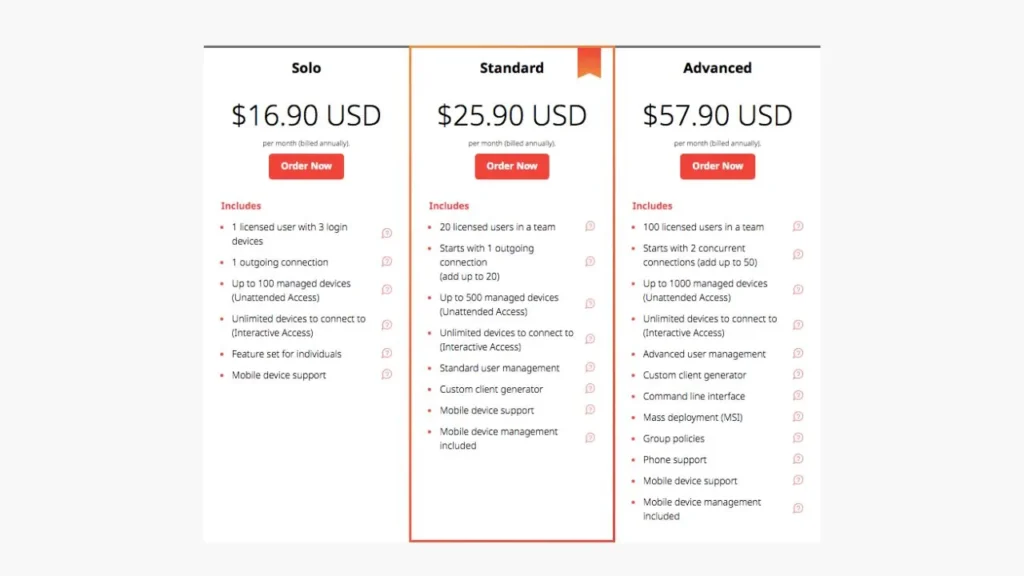
In short, beginners and small users can start with the free version of AnyDesk while businesses can upgrade to paid plans for more advanced tools, flexibility and support.
System Requirements
Operating System
Compatible with:
- Windows 7, 8.1, 10, 11
- Windows Server editions
Hardware
- Windows: 7, 8.1, 10, 11.
- Processor: Dual-core 2.0 GHz (or faster) recommended.
- RAM: 1 GB (2 GB+ recommended).
- Graphics: DirectX/Direct3D capable, 32 MB VRAM.
- Hard Disk: 20 MB.
- Sound Card: Required for AnyDesk voice chat.
- Microphone: required for AnyDesk voice chat.
- Internet: Broadband for best results (works on 100 kbps too).
If your PC meets these specs, AnyDesk will run smoothly on Windows. It is notable that even very modest hardware (e.g. older laptops) can host an AnyDesk session, albeit with reduced graphics quality if needed.
Conclusion
AnyDesk is a fast and dependable tool that lets users connect to computers remotely with minimal effort. It offers a clean, straightforward interface along with useful features such as file transfer, remote connectivity, and secure communication.
Whether you’re working from another location, helping someone fix a technical issue, or simply accessing your own system from afar, it provides a convenient and practical way to stay connected. Setup is quick, and the free version is enough for personal use, making it easy for most users to get started.
For organizations or professional environments, paid plans are available that include additional tools, higher flexibility, and dedicated support.
Setup Details
- Software Name: AnyDesk
- Download File Size: 10 MB
- Application Type: Free / Full Standalone Setup
- Compatibility: Both (32-bit and 64-bit)
- File Format: WinRAR File
- Password: thelearnerz.com
Download Links
Note: Password for all files is thelearnerz.com
By clicking this button your download will start automatically, after the countdown. Please click only once and wait for the application to begin downloading.
DownloadIf you want to download AnyDesk from Official site please visit @AnyDesk.

It is excellent idea