Table of Contents
Driver Booster is a useful Windows tool that helps you keep your computer’s drivers updated without any complicated steps. Drivers are small programs that allow your hardware such as your graphics card, sound system and Wi-Fi to work properly with your operating system.
When drivers become outdated or missing, your PC may face issues like slow performance, no sound, display errors or connectivity problems. Driver Booster helps prevent these issues by automatically scanning your system and finding drivers that need updating.
Instead of searching for updates manually Driver Booster lets you update everything with just one click. It uses a large database of safe and verified drivers, which helps improve system stability, reduce errors and even enhance gaming performance.
In this guide, you’ll learn how Driver Booster works, explore its main features, understand how to download and install it and decide whether the free or paid version suits your needs best.
Easy to Use Interface
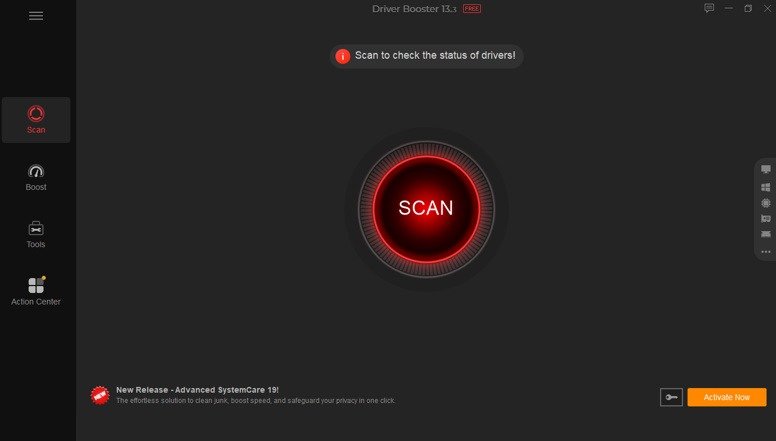
One of the best things about Driver Booster is how simple and user friendly it looks right from the start. When you open the program you’ll immediately notice a large and clear Scan button on the main screen. You don’t need to search through menus or settings just click that button and the software will automatically check your computer for outdated, missing or faulty drivers within a few seconds.
All the results are displayed in an organized way with clear labels and categories, so you can easily understand what needs attention. Even if you’re not very familiar with computers the interface guides you step by step making the whole process feel effortless and stress free.
The overall layout is clean and uncluttered which means you won’t feel overwhelmed by too many options. Important sections like tools, system information and settings are placed neatly and are easy to access whenever needed. In short, Driver Booster is designed in a way that anyone from beginners to experienced users can use it comfortably without needing any technical knowledge.
Why People Use Driver Booster?
There are many driver update tools, but Driver Booster stands out for a few reasons:
Large Driver Database
Driver Booster has access to a huge collection of drivers from many different hardware brands. This means it can support a wide range of devices from graphics cards to printers and network adapters. All drivers are taken from official sources and tested for safety so you don’t have to worry about installing harmful or unstable files on your computer.
One Click Updates
With Driver Booster you don’t need to waste time searching for drivers online. The software automatically scans your system, finds outdated or missing drivers and installs the latest versions with just one click. This makes the whole process fast, simple and perfect for users who don’t have technical experience.
Better Gaming Performance
Driver Booster is especially useful for gamers because it keeps game related drivers up to date. It can also stop unnecessary background programs that use system resources, helping your computer run games more smoothly. As a result, you may notice better speed, improved frame rates and less lag during gameplay.
Fixes Common Problems
Many common computer issues are caused by driver problems. Driver Booster includes built in tools that can help fix errors like no sound, display glitches or Wi-Fi connection issues. Instead of troubleshooting manually you can resolve these problems quickly with just a few clicks.
Safe Updates
Safety is an important part of Driver Booster. Before installing any new driver the software automatically creates a backup of the current one. If something doesn’t work properly after the update you can easily restore the previous version. This ensures that your system stays stable and protected at all times.
Main Features Explained
1. Automatic Driver Updates
Driver Booster automatically scans your computer to detect outdated, missing or faulty drivers. Once the scan is complete, you can update all drivers with a single click saving you the trouble of searching and installing them manually. This not only saves time but also reduces the chances of downloading the wrong drivers.
Another useful feature is offline updating. If your computer doesn’t have internet access or has network issues you can still update drivers using files downloaded from another device. This makes Driver Booster practical even in situations where connectivity is limited.
2. Backup and Restore
Before making any changes Driver Booster creates a backup of your current drivers. This ensures that your system remains safe even if something goes wrong during the update process.
If a newly installed driver causes issues you can quickly restore the previous version without any hassle. In addition the software creates system restore points giving you an extra layer of protection so you can roll back your system to a stable state whenever needed.
3. Fixing PC Issues
Driver Booster is not just for updates it can also help fix common hardware related problems that many users face. These include:
- No sound from speakers or headphones.
- Poor display quality or screen resolution issues.
- Network and internet connection problems.
Instead of trying complicated fixes you can use the built in repair tools to solve these issues quickly. This makes it especially useful for users who want simple solutions without dealing with technical troubleshooting.
4. Game Boost Mode
Driver Booster includes a Game Boost feature that helps improve gaming performance in a simple way. When you turn it on it temporarily stops unnecessary background programs so your system can use more power for the game.
It also keeps your graphics and game related drivers updated which helps improve compatibility and reduce issues like lag or stuttering. Overall it’s an easy way to make games run a bit smoother without any technical effort.
How to Download Driver Booster
Step 1: Download Driver Booster
- Go to the Download Link.
- Click on the download button to start downloading Driver Booster.
Step 2: Extract and Run the Setup
- Right click the file and select “Extract Here“. (You’ll need a tool like WinRAR or 7-Zip to extract it.)
- After extraction, run the Driver Booster.exe file to install program.
- Follow the on screen steps.
- Done! You have successfully downloaded and installed Driver Booster.
Free vs Paid Version
Driver Booster is available in two versions, so users can choose based on their needs and budget.
Free Version
The free version gives you the basic features needed to keep your drivers updated. It allows you to scan your system for outdated drivers and update them manually when needed. You also get access to a large collection of drivers which is enough for everyday use like fixing common issues and maintaining system stability. This version works well for casual users who only need simple driver updates without extra features.
Pro Version (Paid)
The Pro version offers more advanced and convenient features. It provides faster downloads, automatic updates and access to a wider range of drivers. It also includes better optimization for gaming helping improve performance and reduce lag. In addition users get priority support for quicker help if any issues arise. The Pro version works on a subscription basis but it usually comes with a trial option so you can test its features before deciding to buy.
If you want to check pricing please visit: @Check_Pricing
System Requirements
Driver Booster is lightweight and can run on most Windows PCs even older ones. Here are the basic requirements:
- Windows: Windows 7 or later
- Processor: 1 GHz or higher (basic Pentium or modern CPU works fine)
- RAM: At least 1 GB (4 GB or more recommended for smooth performance)
- Graphics: Not required
- Hard Disk: Around 1 GB free space (for drivers and installation files)
- Display: Minimum 1024×768 resolution
- Internet: Required for downloading driver updates
Overall Driver Booster does not need a powerful system and can easily run on most low to mid range computers.
Conclusion
Driver Booster is a reliable and easy to use tool that helps keep your computer’s drivers up to date without any technical effort. It saves you from the trouble of manually searching for drivers and also helps fix many common system issues that can slow down or affect your PC’s performance.
One of its biggest strengths is its simple interface, which makes it very beginner friendly. At the same time it also includes useful advanced features like Game Boost, automatic updates and driver backups making it suitable for more experienced users as well.
Overall Driver Booster works as an all in one solution for maintaining system stability and improving performance. If you only need basic driver updates the free version is a good choice. However if you want faster updates, extra features and a more hands off experience upgrading to the Pro version can be a better option.
Setup Information
- Software Name: Driver Booster
- Version: 13.3.0
- File Size: Around 30 MB
- Supported Systems: Windows (7 and above)
- Format: WinRAR File
- Password: thelearnerz.com
Download Links
Note: Password for all files is thelearnerz.com
By clicking this button your download will start automatically, after the countdown. Please click only once and wait for the application to begin downloading.
Download