Table of Contents
IObit Uninstaller is a Windows utility designed to help you completely remove unwanted programs from your computer. Although Windows already includes a basic uninstall option it often does not fully remove everything related to a program. In many cases leftover files, hidden folders and registry entries remain on your system which can take up space and sometimes slow down your PC over time.
This is where IObit Uninstaller becomes useful. It goes beyond the standard uninstall process by finding and removing all leftover data linked to the software. This helps keep your computer cleaner more organized, and running more smoothly.
The tool is also very easy to use making it suitable for beginners who just want a simple way to remove unwanted apps without confusion. At the same time it also offers helpful features for more experienced users who want deeper control over system cleanup.
In addition to regular programs IObit Uninstaller can also remove Windows apps and browser extensions that you no longer need. This makes it a complete cleanup solution for managing software, improving system performance and keeping your PC clutter free.
User Interface and Ease of Use
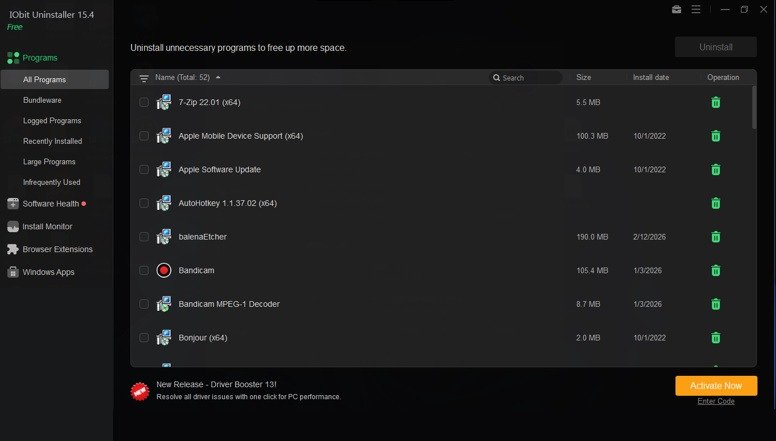
One of the best things about IObit Uninstaller is its clean, simple and user friendly design. When you open the program, it immediately shows you a complete list of all the applications installed on your computer, so you don’t have to search around or go through complicated menus.
To make things even easier, the software organizes everything into clear categories such as:
- Recently installed programs.
- Large software that takes up more space.
- Bundled or potentially unwanted apps.
This organized layout helps you quickly understand what is installed on your system and decide what you want to remove. You don’t need any technical knowledge to use it, as everything is clearly labeled and easy to follow.
Uninstalling programs is also very simple. You can remove an app with just a single click and if needed you can also select multiple programs and uninstall them together. This batch removal feature saves a lot of time especially if you are cleaning up many unused applications at once.
In addition there is a built in search bar that allows you to instantly find any specific program without scrolling through the entire list. The overall design is smooth, well organized and beginner friendly making it easy for even first time users to manage their installed software without confusion.
Why Use IObit Uninstaller Pro?
There are many uninstall tools available but IObit Uninstaller Pro stands out because it gives you more control, deeper cleaning and added convenience compared to basic uninstallers.
Here are some key reasons why many users prefer it:
- Remove multiple apps at once: Instead of uninstalling programs one by one you can select several apps and remove them together. This saves a lot of time especially when cleaning up a cluttered system.
- Identify unwanted browser extensions: It uses community based feedback to help you spot suspicious or unnecessary browser add ons so you can keep only the ones you actually need.
- Wide compatibility: It works on almost all Windows versions including older systems, making it a flexible option for different users.
- Advanced cleaning tools: The Pro version includes extra features that can remove hidden files, leftover data and stubborn programs that normal uninstallers often miss.
- Improves system performance: By removing unnecessary software and junk files, it helps free up storage space and can make your computer run faster and smoother.
- More powerful removal options: With features like force uninstall, it can delete programs that refuse to uninstall normally.
In short IObit Uninstaller Pro makes the process of cleaning your computer quicker, easier and much more thorough helping you keep your system organized and running efficiently.
Requirements
- Operating System: Windows 7 or newer (works best on Windows 10 and Windows 11).
- Processor: At least 1 GHz (a faster dual core processor is recommended for smoother performance).
- Memory (RAM): Minimum 1 GB (4 GB or more is better for multitasking).
- Storage Space: Around 300 MB of free space for installation and basic use.
- Administrator Access: Required to uninstall programs and make system changes.
- Stable System: Make sure your PC is running properly during uninstall processes to avoid interruptions.
Key Features of IObit Uninstaller
1. Remove Multiple Programs at Once
IObit Uninstaller allows you to select multiple applications and uninstall them in a single process. This is much faster than removing programs one by one using the default Windows method. It’s especially useful when you want to clean up your system quickly. After the process is complete, the tool provides a summary showing how many files and leftover items were removed, giving you a clear idea of the cleanup results.
2. Installation Tracking
This feature keeps track of new software installations on your computer. It records all the changes made during the installation process such as files added and system settings modified.
When you decide to uninstall that program later IObit Uninstaller uses this saved information to remove everything completely. This ensures that no hidden files, folders or leftover settings are left behind resulting in a much cleaner system.
3. Software Update and System Check
IObit Uninstaller can scan your system to check if any installed programs are outdated. If updates are available it notifies you so you can keep your software up to date which is important for both performance and security.
In addition it performs a system health check that looks for:
- Unnecessary or temporary files.
- Suspicious or harmful plugins.
- Problems caused by leftover data.
By fixing these issues the tool helps improve your computer’s speed, stability and overall safety.
4. Remove Browser Extensions
Over time, browsers can collect many extensions, toolbars and add ons that you may no longer use. Some of these can even slow down your browsing or affect your privacy.
IObit Uninstaller provides a dedicated section where you can easily view and remove extensions from popular browsers like Chrome, Edge and Firefox. It also helps block unwanted notifications and pop ups giving you a cleaner and smoother browsing experience.
5. Force Removal and File Cleaning
Sometimes certain programs refuse to uninstall through normal methods. In such cases the Force Uninstall feature helps remove these stubborn applications without hassle.
Additionally the built in file shredder allows you to permanently delete sensitive files. This means the files cannot be recovered later which is useful if you want to protect your personal or confidential data.
How to Download IObit Uninstaller
Step 1: Download IObit Uninstaller
- Go to the Download Link.
- Click on the download button to start downloading IObit Uninstaller.
Step 2: Extract and Run the Setup
- Right click the file and select “Extract Here“. (You’ll need a tool like WinRAR or 7-Zip to extract it.)
- After extraction, run the IObit Uninstaller.exe file to install program.
- Follow the on screen steps.
- Done! You have successfully downloaded and installed IObit Uninstaller.
Is IObit Uninstaller Free or Paid?
IObit Uninstaller is available in two versions a free version and a paid Pro version. Both are useful but they are designed for different types of users depending on how much control and functionality you need.
Free Version
The free version includes all the basic tools needed to keep your computer clean and organized. It allows you to:
- Remove regular programs and Windows apps.
- Delete leftover files after uninstalling software.
- Uninstall multiple programs at once (batch uninstall).
- Access essential cleanup and management tools.
This version is more than enough for most users who just want to remove unwanted software and free up space. It’s simple to use and handles everyday cleanup tasks without any cost.
Pro Version
The Pro version is a paid upgrade that unlocks more advanced features for deeper cleaning and convenience. It includes:
- Automatic updates for outdated software.
- Stronger removal tools for stubborn or hard to delete programs.
- More advanced cleanup features for leftover files and system junk.
- An ad free experience inside the software.
- Priority customer support.
The Pro version is ideal for users who want more control over their system, better performance optimization and extra security features. It’s especially useful if you frequently install and remove software or want a more automated cleanup experience.
If you want to check pricing please visit: @Check_Pricing
Conclusion
IObit Uninstaller is a practical and reliable tool for removing unwanted software from your computer. Unlike the default Windows uninstaller, it goes a step further by deleting leftover files, hidden folders and unused data that can build up over time. This helps keep your system clean, organized and running more efficiently.
The software is easy to use even for beginners while still offering useful features for more advanced users who want deeper control over their system. Whether you want to uninstall a single program, remove multiple apps at once or clean up browser extensions it provides a simple and effective solution.
The free version is suitable for most everyday tasks and does a great job of basic cleanup. On the other hand, the Pro version offers additional features for users who need more powerful tools, automation and advanced removal options.
Overall, if your computer is starting to feel slow, cluttered or filled with unnecessary programs IObit Uninstaller is definitely worth trying as a quick and effective way to improve performance and free up space.
Download Links
Note: Password for all files is thelearnerz.com
By clicking this button your download will start automatically, after the countdown. Please click only once and wait for the application to begin downloading.
Download